
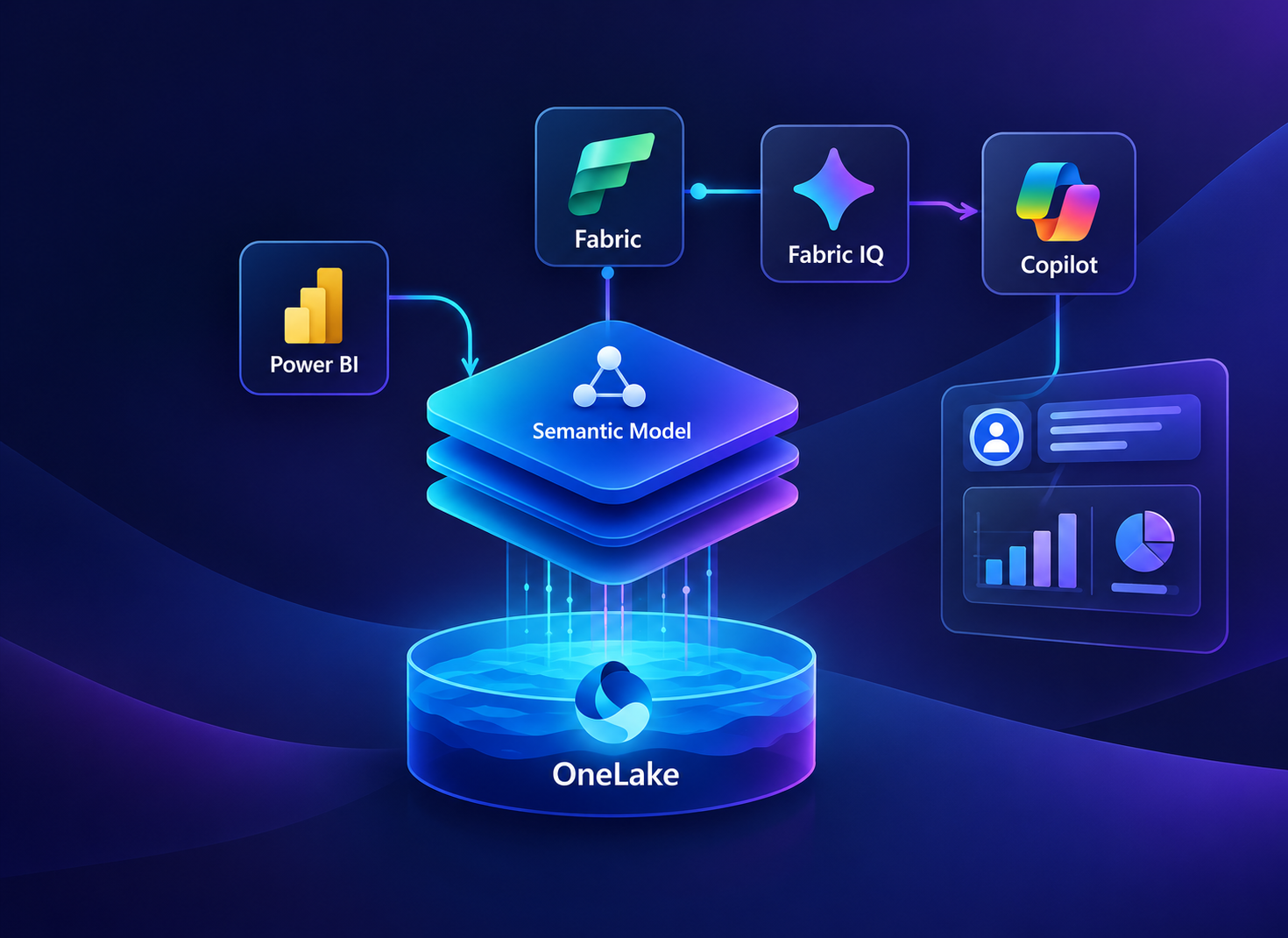
Teams now use Power BI, Fabric, Fabric IQ, and Copilot at various stages of a project life cycle. A reporting team also implements Power BI, a data engineering team operates Fabric, and somebody hears about Fabric IQ at a conference. After that, a manager asks why the overall revenue in Copilot differs from the dashboard, but no one can explain. An insight into Power BI, Fabric, Fabric IQ and Copilot is really a question of sequence. The data will go to OneLake, shape into a semantic model, pick business meaning in Fabric IQ, and connect people via Copilot and agents. Skip any layer, and the responses begin to change. In this article, we’ll look at what each layer does and a seven-step rollout that prevents rework and delays. This is in line with Microsoft docs. How the Four Layers Fit TogetherFabric is mainly a platform that works underneath. OneLake is a data lake that stores data in a single governed location so other layers can read from the same source. Power BI sits on top of that dataset and packages it as a semantic model that retains measures and dimensions for reports and use. Fabric IQ is yet another level of business logic that’s on top of the model that defines concepts, including customer or shipment, once. So both reports and agents can share them. Copilot lets people ask real questions, and it answers through the semantic model running in the background. Why the Timing MattersAgents are immediately landing on business software that raises the stakes for every definition across the model. A recent Gartner prediction reports that 40% of enterprise applications will include task-centric AI agents by the end of 2026, up from less than 5% the previous year.
Source:Gartner’s prediction of enterprise apps featuring task-specific AI agents An agent that reviews a weak measure will repeat it confidently. This underscores the need to pay closer attention to the model before an agent arrives. How to Put Power BI, Fabric, Fabric IQ and Copilot Together Step by StepHere are a few steps that follow the overall dependency chain, with each one adding something solid for the next step. Bring the Data Into OneLakeOneLake is the source from which everything else in the stack reads. So the first step is to bring business data into a single, governed place. Shortcuts and mirroring will enable teams to reference data where it’s already present instead of copying it. Focus on these main areas of action:
This is where cloud data management becomes routine, with connected sources and set permissions. These additional layers will trust what they read. Clean Up the Semantic ModelThe semantic model is another layer that Copilot agents and the ontology read. It starts with a single high-visibility model because a clear definition improves every report and answer that relies on it. Focus on these main areas of action:
After passing this review, Power BI Semantic Models share reports, while Copilot and later agents document the same figures. This way, revenue will match wherever anyone is asking for it. Put the Model Under Version ControlA record is required for any changes made to a clean model. Fabric helps you connect a workspace to a Git repository on GitHub or Azure DevOps, and deployment pipelines can move content through stages, including Dev, Test, and Production. Focus on these main areas of action:
A strong Microsoft Fabric DevOps routine ensures a renamed measure reaches production only after testing. This safeguards every report and agent that would read the model. Prepare the Model for CopilotAnswers are always better with Copilot when the model itself explains everything. Microsoft provides Prep data for AI options on the semantic model, but they remain disabled until you turn on Power BI Q&A for the model. Focus on these main areas of action:
This is where Microsoft Copilot for Power Platform development becomes important, as it can answer questions using the team’s curated definitions. Generate an Ontology From the ModelFabric IQ includes ontology components, still labeled as preview, defining core business concepts with their dedicated guidelines and connections. It’s often generated from a semantic model that already operates in production, saving a complete rebuild. Focus on these main areas of action:
As the ontology starts with Power BI semantic models already in production, people’s trusted definitions carry forward instead of being rebuilt from scratch. Add Data Agents on TopA data agent acts as a virtual analyst that answers natural language questions for a single domain. It remains grounded across semantic models and ontologies. It then gets published to Microsoft 365, Foundry, Copilot Studio and other custom apps. Focus on these main areas of action:
This is where Enterprise AI solutions gain trust. It happens when each agent has a smaller job and answers from definitions the business already agrees on. This keeps the initial release small and helps. Use Operations Agents to Act on Live DataOperations agents can view real-time data, spot anomalies and suggest the right business actions. They reason across similar business concepts in the ontology, so a late shipment is judged against definitions teams often use. Focus on these main areas of action:
This makes operations across digital transformation and process automation easier when alerts like these feed directly into approval and ticket workflows instead of landing in an inbox. How Professional Consulting Services Supports Microsoft Analytics ProjectsPlacing data, models and AI in the right sequence requires planning. Most teams will need a dedicated partner to maintain sequential work. This is where professionals step in as an enterprise IT consulting firm, supporting clients with Microsoft analytics, cloud and automation projects. Here’s how experts can support your operations:
Contact us today for a free consultation to plan a dedicated data setup for each layer. Frequently Asked QuestionsQ. Will a paid capacity be necessary to utilize Copilot in Power BI?Yes. Microsoft indicated that the workspace should be on a Power BI Premium P1 or above capacity or a paid-up Fabric F2 or above capacity. Not supported trial capabilities
|
Power BI, Fabric, Fabric IQ and Copilot: How It All Fits Together


Share with your community!
BLOGS